The fourth skill in the free series is the one editors ask about most: give it a folder of clips and a song, and it cuts a montage where every edit lands on the beat. No timeline, no manual tapping along to find the tempo — it listens to the track and works the beat out itself.
Why "cutting on the beat" is harder than it sounds
Every editor knows the feeling of a montage that's almost right — the cuts are close to the music but not quite locked to it, and that half-a-frame of drift is exactly what makes a sequence feel amateur instead of polished. Getting it truly locked usually means scrubbing back and forth, tapping a key on every kick drum, and hoping your reflexes didn't lag.
The other option is software that detects tempo for you, but most of that comes bundled in an editing app or a heavyweight audio library. I wanted something that just reads an audio file and hands back exact cut points — no plugins, no dependencies you have to fight to install.
What the skill does
Point it at a folder of clips and a song. It analyzes the track, works out the tempo and where the beats actually fall, and cuts your clips so every edit lands on one. Here's what that detection looks like on a test track — each blue line is a beat the skill found, lined up against the waveform:
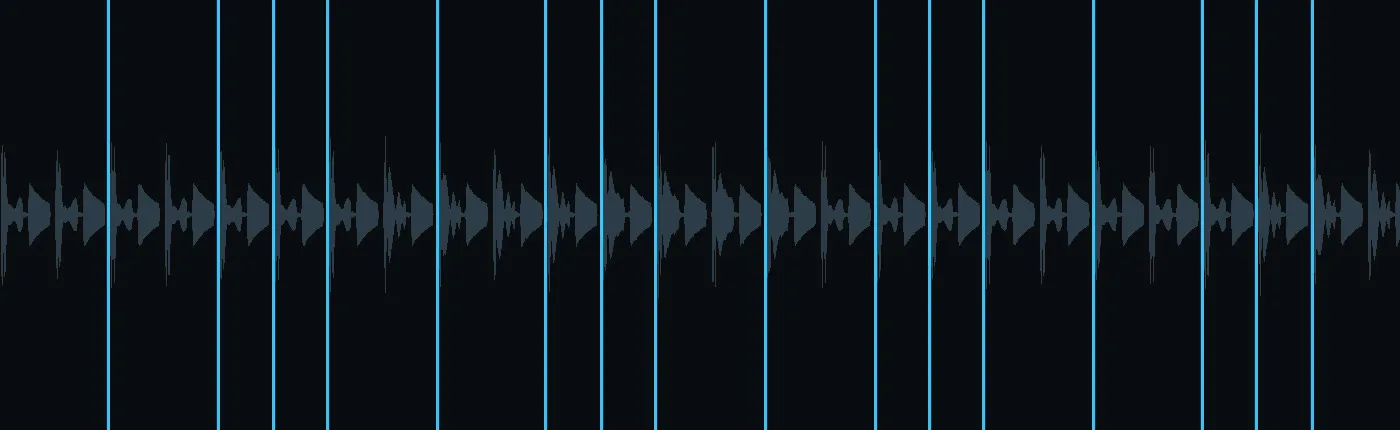
The skill's beat grid over a 128 BPM test track — every line is a cut point.
Feed it a stack of clips like these and it edits them into that grid in filename order, so you control the story just by naming your files:

A mixed folder of stock clips — the skill cuts them to the beat in the order you name them.
How it finds the beat without heavyweight libraries
Most beat detection leans on numpy and a signal-processing library. This skill doesn't use either — it's plain Python standard library plus ffmpeg. Here's the shape of it, in plain terms:
- Decode twice. ffmpeg turns the audio into raw samples once at full range, and again with a low-pass filter so bass and kick drums — the part of a track that actually carries the beat — stand out clearly.
- Measure the energy, not the pitch. The skill tracks how the sound's loudness changes over time (its "energy flux") rather than trying to identify notes. Spikes in that curve are onsets — moments something hit.
- Find the repeating pattern. Once it has a list of onsets, it looks for the interval that repeats most consistently, which gives it the tempo and where the first beat sits.
- Round without drifting. Cut points get rounded to whole video frames one at a time, carrying the leftover fraction forward — so small rounding errors never accumulate into audio and video drifting apart over a long montage.
On a test track with a known, hand-built tempo, this found the beat exactly, and the cuts landed within a single frame of the correct spot on average.
How to use it
One command does the whole cut:
python3 beat_montage.py --clips ./footage --music track.mp3 --out montage.mp4
If a track's beat is hard to detect — sparse intros, unusual mixing — you can just tell it the tempo instead of asking it to guess:
python3 beat_montage.py --clips ./footage --music track.mp3 --out montage.mp4 --bpm 120
Want a specific editing rhythm instead of a cut on every single beat? A pattern controls that:
python3 beat_montage.py --clips ./footage --music track.mp3 --out montage.mp4 --pattern 2,2,1,1
That last flag is the real taste knob — it's the difference between a metronomic cut-every-beat montage and one that breathes, holding some shots for two beats and snapping others on a single beat for emphasis.
Getting the skill
This is the fourth in my free series of small, single-purpose Claude skills for anyone new to Claude who wants a quick, satisfying win — no editing app, no subscription, no numpy install to fight with. If you'd like this one, reach out or follow along on LinkedIn, where I'm sharing the whole set.